28.06.2026
Traveling abroad is exciting, but a phone that doesn't work properly after landing can quickly ruin the experience. Whether you are using an eSIM, a local physical SIM card, or traditional roaming, spending a few minutes preparing your device before departure saves time and prevents unexpected charges.
Quick Summary:
Preparing your phone before your trip ensures you stay connected from the moment you land, helps avoid expensive roaming charges, and prevents common travel connectivity problems.
An eSIM is a digital SIM embedded in your smartphone. It allows you to download a cellular profile directly over a Wi-Fi connection, meaning you can set up a local data plan without visiting a physical store or swapping out plastic chips.
Using an eSIM allows you to keep your primary phone number active for two-factor authentication texts while using a separate profile for local mobile internet.
To verify your specific model, check our directory of Compatible Devices.
Your phone must be network unlocked to accept a travel eSIM or a foreign SIM card. A carrier lock (or SIM lock) restricts the device to a single network provider. This usually applies to phones bought on installment plans or carrier contracts.
If you try to install a travel profile on a locked device, you will get a "SIM Not Supported" error.
Updating your operating system on public airport Wi-Fi is risky. Updates often require large data downloads and a stable connection.
Perform the update at home 24 to 48 hours before your flight using your secure home Wi-Fi.
A common issue travelers face is waiting until they arrive at their destination to install the eSIM. You need an active internet connection to download the profile. If the destination airport lacks reliable Wi-Fi, installation becomes difficult.
If you plan to upgrade your phone before the trip, check our guide on the Best Budget eSIM Phones for Travel.
Once you land, configure your dual-SIM settings so your device uses your travel plan for internet access instead of your domestic carrier.
Travel eSIMs connect to local partner towers via roaming architecture.
To avoid unexpected charges from your home carrier:
Set your Preferred Network Type to 5G or LTE/4G Auto. If you are visiting a rural area with limited 5G infrastructure, switching to LTE/4G prevents your phone from draining its battery while searching for a weak 5G signal.
For a more detailed breakdown, read Should Data Roaming Be Enabled for an eSIM?
Mobile networks can drop in remote areas or inside concrete buildings. Having offline maps ensures you can navigate without an active connection.
Open the Google Maps app, search for your destination city, tap your profile icon, and select Offline Maps.
Downloading regional maps to your device allows your GPS to plot your location and provide driving directions without consuming your mobile data.
Download and log into necessary travel apps while you have a reliable home network. Many of these apps require SMS verification, which can be complicated if you set them up abroad.
| Category | Apps | Preparation Action |
| Navigation | Google Maps | Download local regional maps offline |
| Translation | Google Translate | Download local languages for offline use |
| Messaging | WhatsApp / Telegram | Complete SMS phone verification |
| Flights | FlightRadar24 / Airline Apps | Load digital boarding passes offline |
| Hotels | Booking.com / Airbnb | Sync check-in details and host contacts |
| Taxi | Uber / Bolt / Grab | Add an international credit card |
| Currency | XE Currency | Open the app to refresh exchange rates |
| Food | Uber Eats / GrabFood | Check if delivery works in your destination |
Background data syncs can quickly drain your travel data package. Phones naturally use available connections to update apps and sync photos.
Do not rely on a live internet connection to retrieve vital documents at immigration or check-in counters. Create a specific folder on your phone and save offline copies of:
Using GPS, the camera, and searching for cell towers drains battery quickly while traveling.
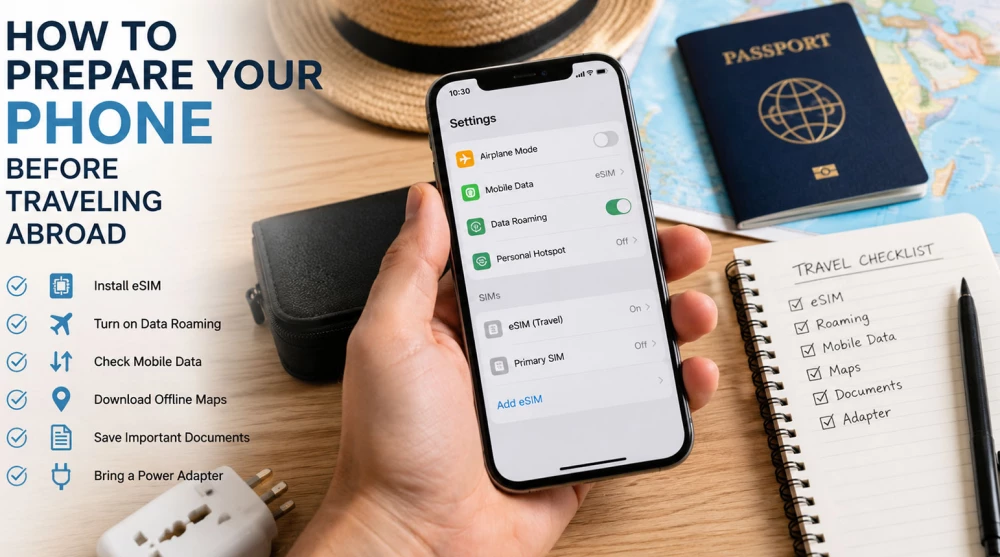
Before leaving for the airport, run through this quick checklist:
If you have full bars but no connection, read: eSIM Installed but No Internet?.
For details on network stability, see Does an eSIM Have Better Signal Than a Physical SIM?
Yes. If you leave your primary physical SIM active and only assign mobile data to your travel profile, your phone operates in Dual SIM mode. You can receive calls and SMS on your home number, but your home carrier may charge international rates for answered calls.
This message means your phone is locked to your domestic network. Contact your home service provider and ask for a network unlock.
No. An eSIM profile is tied to the specific hardware of the device that first scans the QR code. It cannot be transferred. You must purchase a separate plan for each device.
Taking time to configure your phone before leaving prevents roaming fees and connectivity issues. Whether you're heading to Europe, Asia, or North America, having your settings ready ensures your mobile internet works as soon as you land.
Browse our travel eSIM plans and stay connected worldwide:
It is best to install your profile at home or the airport before departure. Downloading it requires a stable Wi-Fi connection, which might be missing upon arrival. Your plan will only activate automatically once you connect to the local network at your destination.
Yes, you absolutely must enable the data roaming feature for your travel profile. This allows your device to connect to local partner networks abroad. Just make sure roaming on your primary card is turned off to avoid unwanted carrier charges.
You can check this in your device settings under the carrier lock or information section. The most reliable method is to insert a physical SIM card from a completely different network provider. If your phone finds a network and makes calls, it is unlocked and ready for travel.
Yes, modern smartphones easily support using two active network profiles simultaneously. You can leave your primary card active for calls and texts while assigning the travel eSIM strictly for mobile data. This keeps you reachable without paying expensive international roaming fees.
First, ensure the profile is selected as your primary source for mobile data and that roaming is enabled. Never delete your profile, as it is designed for single use and cannot be restored. If the issue persists, restart your device and contact customer support for further assistance.
Open the Google Maps application while you still have a stable internet connection before your trip. Search for your destination, tap your profile icon, and select the offline maps option. This guarantees you will have navigation and directions even if you temporarily lose coverage abroad.
Yes, as long as you leave your primary physical card active within your phone settings. It will continue to receive incoming calls and text messages, including important bank verification codes. Keep in mind that your home carrier might charge you standard international rates for answering voice calls.
Travel profiles are unique digital codes intended exclusively for a one-time installation. If you remove the profile from your settings, it is permanently lost and cannot be scanned again. In this case, you must contact us, and depending on the carrier's code reissue policies, a small fee may apply.
Yes, an active internet connection is absolutely necessary for the initial download and installation of your profile. It is best to use a secure home Wi-Fi network before you head to the airport. Once the installation is complete, you do not need additional internet to activate the service abroad.
The most effective way is to completely turn off roaming for your primary SIM card before your flight. Utilize a pre-purchased travel profile to handle all of your mobile data traffic abroad. Additionally, disable automatic background app updates so you do not quickly deplete your plan's allowance.