16.07.2026
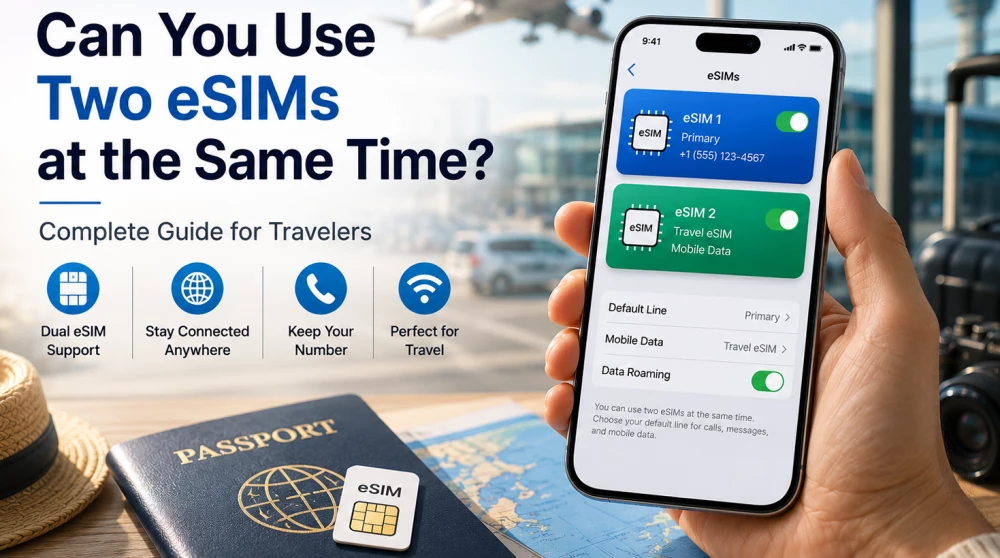
Yes. Many modern smartphones can use two SIM profiles simultaneously. However, whether you can use two active eSIMs depends on your specific device and software version.
The technological evolution in mobile communications has completely changed how we connect, thanks to the embedded SIM card (eSIM). With its widespread adoption, users are no longer limited by physical plastic cards, but new practical questions arise, such as: Can we use two eSIMs at the same time? The answer depends on the brand, model, software version, and hardware specifications of your device. In this comprehensive guide, we will explore how simultaneous digital profiles work, the differences between storing and actively using them, how to configure your device for travel, and how to avoid the most common mistakes.
To fully understand the capabilities of our mobile devices, we first need to make a clear distinction between three main concepts that users often confuse. When talking about using multiple digital plans, it is crucial to define the following scenarios:
Useful Links:
The storage capacity for profiles is one of the greatest strengths of this technology. Instead of carrying around easily lost plastic cards, you can store dozens of subscription plans directly in the software. When you cross the border into a new country, you simply deactivate your current profile and activate the one you need for the new destination. This process takes seconds and requires just a few taps on the screen.
Most modern smartphones can seamlessly store multiple profiles, but the exact number depends entirely on the capacity of the embedded chip and software limitations. Here is how it works with the leading brands on the market:
Important Note: Although your phone can store a large number of profiles, the number of those that can be simultaneously active (to receive signals and transfer mobile data) is strictly limited by the hardware. For most users, however, the ability to store multiple profiles is perfectly sufficient.
Useful Links:
This is the key question that excites modern users who want to completely abandon physical carriers. The ability to simultaneously use two active digital cards is determined by the phone's hardware architecture. For two cards to work simultaneously, the device must support two separate radio frequency paths or special software technology to share resources. Let's look at how the main operating systems handle this:
Apple introduced the ability to use two active digital cards simultaneously with the launch of the iPhone 13. All models from the iPhone 13, iPhone 14, iPhone 15, and newer series support so-called Dual eSIM functionality. This means you can activate two profiles simultaneously without needing a physical card in the slot at all. On older compatible models (such as iPhone XR, XS, 11, 12), you can use a Dual SIM configuration, but only in a combination of one physical SIM card and one digital eSIM. On these older models, it is not possible to have two simultaneously active digital connections.
For devices running the Android operating system, the situation is slightly more complex and depends entirely on the phone's model, brand, and chipset. Support varies significantly:
| Device | Multiple Stored eSIMs | Two Active eSIMs |
| iPhone 13 and newer | ✅ Yes | ✅ Yes |
| iPhone XR – iPhone 12 | ✅ Yes | ❌ No |
| Google Pixel 7 and newer | ✅ Yes | ✅ Yes |
| Samsung Galaxy S23 and newer | ✅ Yes | Depends on model |
| Xiaomi | ✅ Yes | Depends on model |
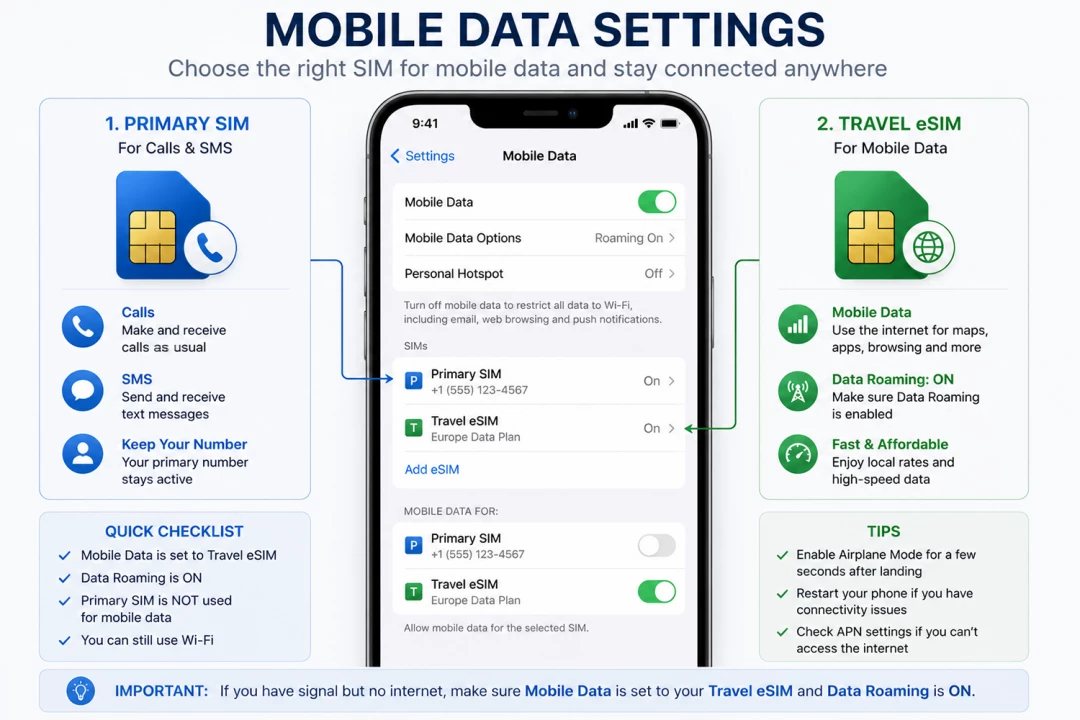
This is the most sought-after topic and the most widely used method for dual-line functionality worldwide. This scenario is extremely practical for frequent travelers or those who want to separate their personal and professional lives on a single device. In this hybrid mode, your primary (home) card remains inserted in the phone's physical slot, and your second line (e.g., a travel profile for the internet) is activated digitally.
Both cards operate in Dual SIM Dual Standby (DSDS) mode, meaning both are active and can receive calls and messages simultaneously. Here is how the classic role distribution looks:
| Profile | Main Function in the Phone |
| Primary SIM Card | Manages: Calls and SMS |
| Travel eSIM | Manages: Mobile Data (Internet) |
This model gives you the best of both worlds: you are fully reachable on your personal phone number for emergency calls and important bank messages (like security codes), while simultaneously surfing the internet at highly affordable local rates through your digital plan, avoiding hefty international roaming fees.
Properly configuring your data transfer settings is the most important step to ensure you don't wake up to a massive phone bill upon returning home. When using a dual-line configuration, you must explicitly instruct your phone's operating system which card is responsible for internet traffic.
Here is what the correct system setup should look like in your connection management menu:
| Setting | Primary SIM Card | Travel eSIM |
| Calls | ON | Off / Inactive |
| SMS | ON | Off / Inactive |
| Mobile Data | Off | SELECTED |
| Data Roaming | Off | ON |
Pay special attention to the last setting: data roaming for the travel eSIM must absolutely be turned on. Since these plans are often provided by international partners and operate on foreign networks, your phone recognizes this connection as roaming. If you do not activate this setting for the profile, you will not have internet access, even if your screen shows signal coverage.
Useful Links:
The short and definitive answer is: Yes, you will continue to receive calls and text messages (SMS) on your main number, as long as you have left it active in your phone settings. The technology allows both lines to function in parallel in standby mode.
When someone dials your main number, your phone will start ringing the standard way. However, you should keep a few extremely important details in mind to optimize your costs:
One of the biggest practical advantages of this innovation is the incredible ease with which you can manage and switch between different profiles. The entire process is managed completely via software through your device's settings menu.
Here is the logic of the process step by step:
| Step | Action in the Menu |
| 1 | Go to your phone's Settings |
| 2 | Open SIM Manager (or "Mobile Networks") |
| 3 | Find and Enable the new profile for the desired country |
| 4 | Disable the old (unneeded) profile |
If you travel frequently between different countries (for example, on a business trip in Asia or a tour around Europe), you can have installed plans for each specific destination. When you land at the new airport, you simply turn off the previous network and turn on the new one. The entire process takes less than a minute and provides you with immediate connectivity right upon leaving the plane.
Although modern mobile operating systems are designed to be as intuitive as possible, working with two lines can often confuse users. Here are the most common mistakes and how to avoid them:
To help you organize the perfect configuration for your next trip, we created this easy-to-follow algorithm. This is the gold standard for settings that guarantees security for your personal finances and flawless internet connectivity worldwide.
| Line / Profile | Calls and SMS | Mobile Data | Data Roaming |
| Primary SIM Card | ON | Off | Off |
| Travel eSIM | Not used | SELECTED | ON |
Once you apply these settings, you can simply enjoy your trip!
No matter your next destination, you can choose the right plan and prepare in advance so you are online immediately upon arrival. Explore our specialized regional offers:
Embedded digital cards have completely changed the rules of the game in international tourism and daily connectivity. Two such cards can work simultaneously only on compatible and newer smart devices (like the latest generations of iPhone or Google Pixel). For older models, as well as for the vast majority of users, the most effective and tested solution remains the hybrid model—a combination of your primary physical card for calls and receiving important incoming messages, and a second travel line exclusively for internet access.
This strategy provides you with maximum flexibility, security against high bills, and peace of mind during any trip. Before you leave, make sure your phone is unlocked to all carriers, choose the plan that best suits your needs, and configure the settings according to our instructions. Preparation takes only a few minutes but guarantees your comfort throughout your entire vacation.
Ready for your next adventure?
Yes, you can use two eSIMs simultaneously if your device supports Dual eSIM technology. This feature is available on newer smartphones like the iPhone 13 series and later, as well as the Google Pixel 7 and up. On older devices, you are usually limited to using one physical SIM card and only one active digital profile at a time.
All models from the iPhone 13, iPhone 14, iPhone 15, and newer series support the simultaneous operation of two active digital cards. This allows you to have two different lines for calls and mobile data without the need for a physical plastic card. For older compatible models like the iPhone 11 or 12, you will need to combine one digital with one physical card.
The ability to use two active digital cards on Android depends entirely on the specific model and manufacturer of the device. Smartphones like the Google Pixel 7 and newer support this feature thanks to the revolutionary MEP (Multiple Enabled Profiles) technology. Most other mid-range Android devices still require the classic combination of one physical card and one active digital profile.
This is the most common and widely supported method for Dual SIM functionality on almost all modern smartphones. You can keep your primary physical card for calls and SMS while activating a travel profile for mobile data abroad. Both cards work in parallel on standby mode, ensuring you will not miss any important messages or calls.
When traveling abroad, it is highly recommended to set your travel profile as the sole source for mobile data. You must explicitly turn on the data roaming option for this card to access the internet. At the same time, data roaming on your primary home line must be completely turned off to avoid high bills.
Yes, your primary phone line will remain active, and you will continue to receive incoming calls and SMS messages while traveling. However, you should keep in mind that receiving calls abroad through your home carrier may incur additional fees. Receiving standard text messages, such as bank security codes, is almost always completely free anywhere in the world.
Switching between different digital profiles is extremely fast and is done entirely via software through your phone's menu. You simply need to enter the mobile network settings, deactivate the current plan, and activate the new one with a single tap on the screen. This process takes only a few seconds and is ideal for people who travel frequently between different countries.
Most modern smartphones can store between 5 and 10 different digital profiles simultaneously in their memory. On the latest flagships from leading brands, this limit is practically restricted only by the free space on the embedded chip. Although you can store many plans for various destinations, the number of those that can be active at the same time remains limited to one or two.
Maintaining two active mobile networks simultaneously consumes slightly more power compared to using just a single line. This rule applies to both configurations with two digital cards and the hybrid combination of a physical and a digital card. However, the difference in battery consumption is minimal and is very rarely noticed during normal daily smartphone use.
If your smart device supports Dual eSIM technology (like the iPhone 14 or Pixel 7), you can activate two travel profiles simultaneously. This is extremely useful if you are crossing borders and want ready access to the internet networks of two neighboring countries at the same time. On older phones, you will simply have to manually switch between travel profiles when moving from one country to another.