28.09.2026
Let's begin with a very typical and common situation among travelers:
You arrive in Spain, activate your travel eSIM, open a website in your browser — and suddenly it thinks you are in France, the UK, or a completely different country. Does this mean your new card has changed your phone's location?
This is a question that causes confusion for many users. The main thesis you need to understand right from the start is this:
A travel eSIM can change your public IP address and the country associated with that internet traffic, but it does not normally change your phone's actual, physical GPS location.
To clear up any doubts, we must clearly distinguish between three core concepts that are often merged into one:
Physical location ≠ GPS location ≠ IP location
When choosing the right travel eSIM for your next trip, it is helpful to know exactly how this technology works and why your internet sometimes "travels" through different countries.
To delve into the problem, we first need to explain the process in simple, human terms.
When your phone uses mobile data, it accesses the global network through a telecom operator's infrastructure. Every device connected to the internet is assigned its own unique identifier. The websites and online services you visit can see the public IP address from which your connection request originates.
This IP address can be used to roughly determine:
the country the traffic is coming from;
the region or state;
sometimes the specific city;
the internet service provider (ISP);
the autonomous system network (ASN).
But here is the most important clarification you must remember:
An IP address does not reveal your exact physical location.
That is, a website does not automatically receive your exact GPS coordinates just because it sees your IP address. It only sees the registration of the network node from which your internet connection exits.
The direct answer to this question is:
Not the installation itself.
If you simply install the digital profile in your phone's settings but continue using your home Wi-Fi network or your primary physical card for internet access, your public IP address has absolutely no reason to change just because of the installation.
The change occurs the moment you select the new travel card for:
Mobile Data
When all your internet traffic starts passing through its network, you will begin using an IP address from the infrastructure through which that specific provider routes the traffic.
The key phrase here is:
Installing an eSIM does not change your internet location by itself. Using that eSIM for mobile data, however, can do so.
This is perhaps the most important section that explains the core of the process. Let's look at a real-world example.
You are physically located in:
Italy
Your phone successfully connects to:
An Italian mobile network (a local operator's antenna)
but your travel card provider routes (redirects) all internet traffic through their servers in:
France
The possible and completely logical result for online systems is:
Physical location: Italy
Mobile network: Italy
IP location: France
This is not a mistake. It categorically does not mean your service is defective or malfunctioning. This is simply how the global architecture of this specific plan is built.
To visualize the path of your data, let's trace a simplified route:
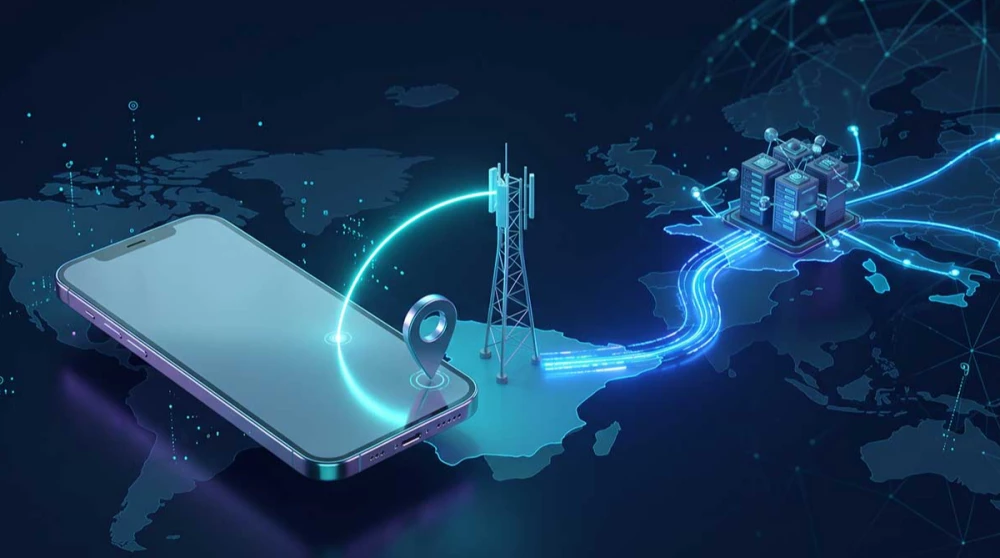
Phone → Local Mobile Network → Roaming Partner → Internet Gateway → Global Internet
With a standard local SIM card, the mobile internet route is usually relatively short and direct, exiting to the global network within the same country.
With an international travel service, however, the traffic may pass through a complex infrastructure physically located in a completely different country before reaching its final destination.
This route depends on multiple factors:
the service provider;
the roaming partner;
the local mobile operator;
the global network architecture;
the location of the internet gateway;
the specifications of the specific plan you purchased.
This exact chain of redirects can lead to the assignment of an IP address that looks as if it is coming from a neighboring or even a distant country.
The answer is a definitive:
No.
Here we must very clearly separate the technologies.
GPS (Global Positioning System) uses direct satellite signals and other hardware location services within the phone itself to determine your physical position with an accuracy of a few meters.
Switching from your home physical card to a travel one in no way moves or confuses your GPS coordinates.
Let's give an example:
You are physically in Bangkok, Thailand.
Your connection has an IP address that geolocates to Singapore.
Navigation apps like Google Maps will still correctly display:
Bangkok
This is because navigation apps use the direct GPS module and hardware location services, rather than relying solely on the IP address of your internet connection.
To make it easier to understand, here is a clear comparison between the two technologies:
|
Feature |
IP Location |
GPS Location |
|
Determined by |
Internet connection and IP address |
GPS satellites and location services |
|
Can it show a different country? |
Yes, it happens frequently |
Usually no |
|
Can a travel eSIM change it? |
Yes |
Not directly |
|
Accuracy |
Approximate (down to country or city) |
Much more precise (down to meters) |
|
Primarily used by |
Websites and online services |
Maps, navigation, and smart apps |
The main takeaway here is clear:
Your IP location tells an online service where your internet connection appears to come from. GPS tells your phone where the device actually is physically located.
Yes, absolutely. In fact, this is the normal behavior of modern smartphones when using a roaming architecture.
Let's give a clear example:
You are in Vietnam.
Your GPS module reads → Vietnam
You are connected to a local mobile network in → Vietnam
Your IP address identifies as → Singapore
There is no technical contradiction in this situation. It is simply that different systems in your phone define the term "location" completely differently, using different data sources. You can comfortably browse plans for an eSIM Vietnam knowing your navigation will work flawlessly despite international routing.
There are several serious technical and economic reasons behind this method of operation. The main ones include:
the architecture of international roaming;
the availability of centralized internet gateways;
the physical infrastructure of the wholesale provider;
regional traffic routing;
commercial carrier agreements;
overall network design and optimization.
To understand the process, we must explain that a large wholesale provider can handle traffic for dozens of countries through a limited number of powerful regional hubs located in key tech capitals. This is significantly more efficient and stable than building or leasing a separate internet breakout for every single country individually.
Categorically:
No.
Some premium plans or those with direct local integration may use an IP address that perfectly matches the country you are traveling in.
Other plans may use a regional IP address (for example, a German IP for travel within the EU) or an entirely foreign IP.
Therefore, we should not make the general conclusion:
Travel eSIM = necessarily a foreign IP address.
The more accurate statement is:
The IP location depends entirely on the network and routing configuration of the specific plan you purchased.
Yes.
Let's look at a hypothetical example of a trip to Japan. You have two products in front of you sold for this destination.
Local network: Operator A
Internet gateway: Physically located in Japan
IP location: Japan
Local network: Operator A or B
Internet gateway: Regional hub in Europe or Asia
IP location: Another country
Both products will provide you with stable internet access in Japan, but their network architecture is fundamentally different. This is also one of the main reasons we explored in detail in our article Why Do Two eSIMs for the Same Country Have Different Prices?. Different infrastructure always leads to different wholesale costs and different technical behavior.
Yes, this is entirely possible and quite common.
Search engines like Google and other complex online services use a combination of hundreds of different signals to offer you the most relevant content, and IP location is one of the primary indicators.
Due to a difference in IP address, a user might temporarily receive:
different local search results;
prices displayed in another currency;
an interface in a different language;
different regional ads;
another regional version of an informational site.
However, we do not claim that the IP address is the only factor. If you are logged into your account and have a search history, Google will try to balance the results.
This question concerns many users. Platforms like Netflix, Disney+, YouTube, and other media services actively use strict IP geolocation when determining accessible content, copyrights, or regional settings.
If your connection's IP address is identified as being from another country, the streaming service may react according to that address, showing you the catalog for that country or temporarily restricting your access to local content.
But we must be very careful with expectations here:
A travel eSIM should not be treated as a VPN service or as a guaranteed method for accessing blocked content from another country.
This is an extremely important practical question for every traveler.
Some banking institutions and strict security systems may use a combination of:
IP address;
device information;
past login history;
country of registration;
network type;
multiple other invisible security signals.
If you usually log into your app from a location in the UK and suddenly the system detects:
GPS: Thailand
IP: Singapore
the software might automatically request additional verification (e.g., a code via SMS or email) because it detects unusual behavior.
We are not saying this will necessarily block your banking app. It is more accurate to phrase it like this:
An unusual IP location may trigger additional security checks on some stricter online services.
Yes. In fact, this is likely the most commonly visible and tangible effect for the average user.
For example:
You are physically located in China.
Your phone is using an excellent local Chinese network.
However, your internet routing exits to the global web through a server in another country to bypass local restrictions.
As a result, some international sites may determine your region based on this external IP address. This specific routing model is highly beneficial for products like an eSIM China, where the external IP address is an advantage that allows you to access the global internet.
The short and clear answer is:
No.
Let's look at the difference between the two mechanisms.
VPN (Virtual Private Network) mechanism:
Device → Encrypted VPN tunnel → Your chosen VPN server → Internet
Travel connectivity mechanism:
Device → Mobile network → Carrier or roaming infrastructure → Internet
With both technologies, the end result might be an IP address from another country, but the reason, technology, and control are completely different. Unlike specialized software, here you usually cannot simply choose USA, UK, Germany, or Japan as a server from a dropdown menu.
The key point here is:
A foreign IP address does not in any way turn your travel connectivity into a fully-fledged VPN software.
We must answer this very carefully so as not to create a false illusion of security.
This technology should absolutely not be viewed as a tool for privacy or absolute anonymity.
Even if your IP location shows you are in a completely different country:
your hardware GPS module continues to show your real position;
installed apps may have direct permission to access your location;
the mobile network itself knows with absolute precision which specific cell (antenna) your phone is connected to;
other system and network signals continue to reveal the actual region you are in.
Therefore:
A different IP location does not make your physical location invisible to systems that have the necessary permissions.
This is a very useful experiment that clearly explains the concept.
When you decide to switch from:
Mobile data via the travel network → To the local hotel Wi-Fi network
your public IP address will instantly change and become the one provided by the hotel Wi-Fi network's ISP.
Example:
Your connection shows → IP address from the Netherlands
The hotel's ISP shows → IP address from Spain
The location remains → Spain in both cases.
This perfectly and visually demonstrates why an IP location is merely a characteristic of the connection, not the real physical location of the device.
A similar situation occurs when your phone has two active lines simultaneously.
For example, your phone contains:
Primary local physical card + Your new travel eSIM
If you specify in the settings that mobile data should pass through your primary local card, all traffic will follow its infrastructure and its IP addresses.
If you switch and select mobile data to be handled by the new travel profile, the routing and consequently the public IP address may instantly change according to the new plan's architecture.
Yes, there is an impact, but routing is not the only thing that determines the final speed.
A longer and more complex geographical route can primarily increase:
response time (also known as delay or latency).
Example:
Traffic travels: Vietnam → Singapore → Internet
versus:
Traffic travels: Vietnam → Europe → Internet
The second route could potentially have a higher ping, simply because the physical distance the signal must travel over fiber optic cables is greater.
However, the overall download speed also depends on many other critical factors:
the quality of the local network;
current cell congestion;
radio signal strength;
access to 4G/5G;
conditions in the roaming agreement itself;
total network capacity.
Let's look at a classic European scenario.
You travel the route:
France → Germany → Italy → Spain
with a single shared regional Europe plan.
Your phone will change local operators and connect to different antennas in each individual country. However, your internet routing may continuously pass through the same shared regional gateway (for example, in Germany) the entire time.
Therefore, your IP location does not necessarily change every time you cross a border with your eSIM Europe plan. The connection remains stable, albeit addressed from a central location.
Let's take a brief comparative look at two of the most popular destinations.
When using a plan for this destination, your phone may physically connect to the networks of EE, Three, Vodafone, or O2, depending on the specific agreements of the chosen plan. However, the IP location will again depend on the overall routing architecture, not just the operator's name on your screen. You can check the options for an eSIM UK for more details.
In a completely analogous way, a plan might use the coverage of giants like AT&T or T-Mobile. But the local operator's name alone does not categorically determine exactly where your public IP address will be geolocated when using an eSIM USA.
If you are curious and want to run a check yourself, the process is extremely quick and practical:
Turn off your Wi-Fi connection completely from your phone's menu.
Ensure you have selected your travel card as the sole source for Mobile Data.
Open a browser and check your public IP through a specialized lookup service (by typing "what is my IP" in Google).
Compare the country the site shows with your real physical location.
Then open your navigation app (like Maps) and compare it with what your GPS displays.
This way, you will immediately see a visual difference between:
IP location versus physical and GPS location.
If this discrepancy creates a practical problem when using a specific site, here are a few quick solutions:
explicitly check if you are currently using mobile data or hotel Wi-Fi;
do a quick check of your current IP location;
restart the connection by toggling Airplane Mode on and off;
check if you accidentally have VPN software running in the background;
make sure the problematic app has permission to access your GPS location in the settings;
if a specific important service flat-out refuses to work, contact their support;
most importantly: do not rush to delete your eSIM just because the IP address shows a different country — this is normal technological behavior.
The primary and most honest answer to this question is:
In most cases — absolutely not.
For the vast majority of daily needs such as:
chat apps (WhatsApp, Viber);
online maps;
checking email;
general web browsing;
social media;
walking or driving navigation;
it usually does not matter in the slightest exactly where your IP address is geolocated from.
The situation may become important and require attention primarily with:
online banking and financial transactions;
media streaming;
websites with strict geographical restrictions;
specific local government services;
some sensitive payment systems.
To visually summarize everything discussed so far, here is a final comparison table:
|
Term |
What It Actually Shows |
Can It Indicate Another Country? |
|
Mobile Network |
Which specific local operator you are physically connected to |
Depends on active roaming |
|
IP Address |
Where it looks to sites like your internet connection is coming from |
Yes, it is entirely possible |
|
GPS |
The exact physical location of the phone itself |
Usually no |
|
Wi-Fi IP |
The location of the ISP for the specific Wi-Fi network |
Yes |
To be completely transparent with our users, we must state the following rule:
The IP location when using travel connectivity depends on the mobile operator, the roaming partner, and the traffic routing infrastructure used by the specific plan. Unless a specific IP location is explicitly stated in the details of the chosen plan, it should not be assumed by default that the IP address will automatically match the destination country.
This is an important technical detail that helps properly manage expectations for every single international trip.
After thoroughly examining all aspects of the technology, the final conclusion is super clear and unambiguous:
A travel eSIM can change your public IP address and the country sites associate with your internet connection, but it does not normally change your phone's actual, physical GPS location.
This means that in the real world:
You can physically be in Vietnam, connected to a Vietnamese mobile network, have a Singapore IP address, and your GPS will still completely correctly show that you are in Vietnam.
So, when planning connectivity for your next adventure, just remember this golden rule:
When using a travel eSIM, remember: where your internet appears to be coming from and where your phone actually is are two completely different things.
Yes, using a travel eSIM for mobile data will change your public IP address. Your internet traffic routes through the eSIM provider's network infrastructure, assigning you a new IP from their system. However, simply installing the eSIM on your phone without actively using its data connection will not change your current IP.
No, a travel eSIM does not change your phone's physical GPS location in any way. GPS relies on direct satellite signals and internal hardware components that operate completely independently of your mobile data. Navigation apps like Google Maps will still accurately display your true physical position in the real world.
Your eSIM might show a different country because your internet traffic is being routed through an international roaming gateway. Many global providers use centralized servers located in major tech hubs to manage connections across multiple countries efficiently. Therefore, while your phone is physically in one country, your IP address reflects the physical location of that routing server.
Yes, it is very common for international travel eSIMs to use a foreign or regional IP address. The IP location depends entirely on where the specific provider's internet gateway is physically stationed. This type of regional routing is a standard and safe practice in the global telecommunications industry to manage roaming traffic.
No, a travel eSIM is not a VPN and does not offer encrypted tunneling or intended anonymity. While both technologies might temporarily assign you a foreign IP address, an eSIM does this strictly for basic network routing purposes. Furthermore, unlike a VPN app, you cannot manually select which country your IP address originates from.
Yes, streaming services actively check your IP address to determine which regional content catalog you are allowed to access. If your eSIM routes traffic through a server in another country, platforms like Netflix might temporarily show you that specific country's library. However, a travel eSIM should never be relied upon as a guaranteed tool to bypass geographical content restrictions.
Yes, banking applications often monitor your IP location as a standard security and fraud prevention measure. If you suddenly log in from a foreign IP address assigned by your new eSIM, the system might flag it as unusual activity. This usually just triggers an extra security step, requiring you to enter a verification code sent via SMS or email.
Yes, two different eSIMs purchased for the exact same destination can easily have completely different IP locations. This happens because competing providers use entirely different roaming partners and network architectures to deliver their service. One provider might route your traffic locally, while the other routes it through a regional hub in a neighboring country.
Yes, complex international IP routing can affect your internet speed, primarily by noticeably increasing latency (ping). If your traffic is routed through a distant country before reaching the website, the response time of the page will naturally be longer. However, your overall download speed still heavily depends on the local network's quality, congestion, and signal strength.
You can easily check your eSIM IP location by turning off your Wi-Fi and ensuring you are only using mobile data. Next, open your browser and use a free online IP lookup tool by searching "what is my IP" on Google. The website will display your current public IP address and the country it belongs to, allowing you to compare it with your physical location.