09.11.2026
The short answer is yes, but this is only possible if your smartphone hardware and software support Dual eSIM technology (two simultaneously active eSIMs). Many users confuse the ability to install multiple eSIM profiles with the ability to use them simultaneously. You can store 5, 8, or even more eSIM profiles in the memory of most modern devices, but having an eSIM feature does not guarantee that your phone can keep two of them active at the exact same time.
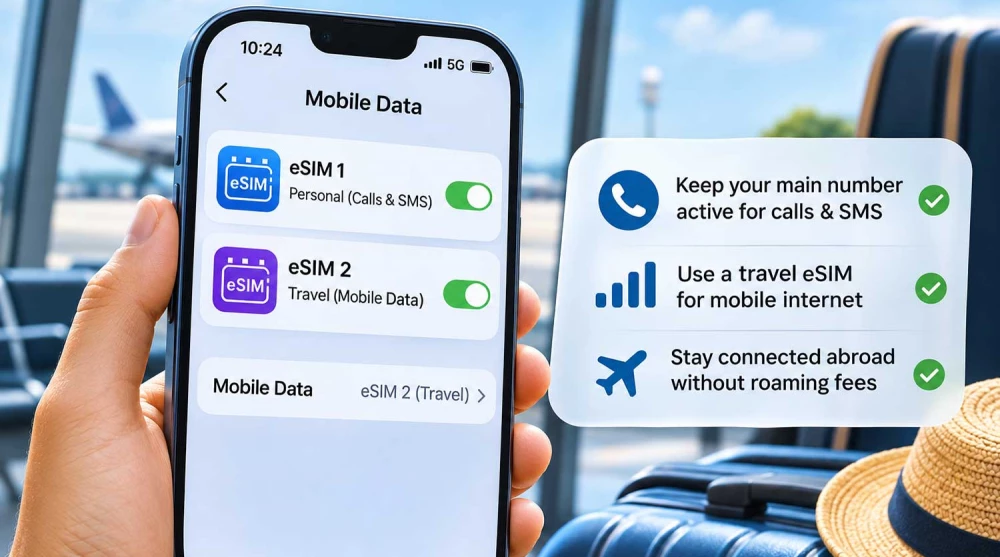
A typical example of fully utilizing two eSIMs simultaneously is keeping your personal number active to receive important incoming calls and SMS messages from your bank, while simultaneously using a travel eSIM to access mobile internet abroad. However, it is important to clarify this upfront: even with two fully active cards, your phone usually uses only one of them for mobile data transmission at any given time, while the other remains in standby mode.
To understand how two eSIMs work simultaneously, we need to look at the eUICC (Embedded Universal Integrated Circuit Card) chip. This is the physical microchip soldered directly onto the phone's motherboard, acting as an electronic vault. The difference between a traditional physical SIM card, an eSIM profile, and a modem is significant. A physical SIM contains the cryptographic keys of a single operator. An eSIM profile is the software equivalent of these keys, and the eUICC is the hardware that can store multiple such software profiles simultaneously.
A single eUICC chip has enough memory to store multiple profiles, but the phone's operating system and the chip's architecture determine how many of these profiles can be activated and connected to the modem simultaneously.
The term Dual SIM is a general concept indicating that a phone can support two active mobile lines. This can be achieved through various combinations. The most common today is a physical SIM + eSIM. Older devices rely on two physical SIM cards. The term Dual eSIM refers specifically to the scenario where both active lines are served entirely by software profiles stored in the eUICC chip, without using a physical slot. Therefore, if a phone is advertised as Dual SIM, it does not necessarily mean it supports two active eSIMs.
DSDS (Dual SIM Dual Standby) is the technology that allows a smartphone to keep two mobile lines on standby, using a single shared radio module (transceiver). The phone registers successfully on both mobile networks, monitoring them simultaneously for incoming activity.
Because the antenna and radio module are shared, when you accept a call on one line, the other may temporarily become unavailable since the modem is occupied. However, on many modern devices, this limitation is overcome. On compatible devices and supported carriers, the second line can use the internet connection of the first via the Wi-Fi Calling feature, allowing you to receive calls even when there is no independent cellular connection.
5G support for two active eSIM lines depends entirely on the specific smartphone model, the built-in modem, and the software version. Some newer flagships allow both lines to be registered on 5G networks in standby mode (5G Standby), but this should not be taken as a general rule. However, you should never expect a simultaneous 5G connection for data transfer, as the operating system routes internet traffic exclusively through one selected line at a time. When you switch data to the other eSIM, the modem terminates the first session and establishes a new 5G session.
Apple is a pioneer in implementing the technology for two simultaneous eSIMs. The Dual eSIM feature is officially supported by the iPhone 13, iPhone 13 Pro, iPhone 13 mini, iPhone 13 Pro Max, and all newer generations (iPhone 14, 15, and 16 series). In addition, the iPhone SE (3rd generation) also features this functionality.
Older models that introduced eSIM to the market (from iPhone XS to iPhone 12) can store multiple profiles but only allow one active eSIM in combination with one physical SIM card. It is crucial to note regional versions: iPhone models sold in the USA (from the 14 series onwards) have no physical SIM slot at all and rely entirely on Dual eSIM. Models for mainland China, Hong Kong, and Macau feature two physical slots and often do not support eSIM whatsoever.
The situation with Samsung requires careful verification. Support for two active eSIMs (Dual eSIM) depends heavily on the specific model, the region of sale, and the software version. A clear line cannot be drawn across all series because the firmware and the processor used (Snapdragon vs. Exynos) create significant differences.
Older flagships from the Galaxy S21, S22, and S23 series support eSIM, but in most of their variants, they only allow one active eSIM combined with a physical SIM. Even if you see two slots for eSIM profiles in your Samsung's SIM manager, it does not automatically mean you can turn them on simultaneously. You must check the documentation for your specific regional model.
Google introduced Dual eSIM support on compatible Pixel 7, Pixel 7 Pro models, and all subsequent generations. For this feature to work (based on MEP - Multiple Enabled Profiles), both hardware readiness of the chip and carrier support are required. You can check this by going to Settings → Network & internet → SIMs, where you can attempt to activate two downloaded profiles at the same time.
Manufacturers like Xiaomi, Motorola, and OnePlus are gradually adding eSIM functionality to their flagship devices. However, the presence of the "eSIM" label in the specifications most often guarantees support for only one active profile. It is extremely rare for these manufacturers to offer full Dual eSIM support for two active software profiles simultaneously. Support must be thoroughly checked for the specific model and region.
To check if your iPhone can work with two eSIMs simultaneously, open Settings and select Cellular (or Mobile Data). If you already have one active eSIM, try to turn on a second installed profile (Turn On This Line). If the phone supports the feature, both lines will remain on. If it does not, the system will prompt you to turn off the first line.
On Samsung devices, this check is done via Settings → Connections → SIM manager. Try activating two already installed eSIM profiles using the toggle switches next to them. If the phone is limited to only one active eSIM, an on-screen warning will appear stating that the current eSIM will be turned off when you try to activate the second one.
For Pixel smartphones, go to Settings → Network & internet → SIMs. If you have one active eSIM profile, tap the second one in the list and select "Use SIM". The phone will ask if you want to use both networks. If both lines remain in "Active" status, your device successfully supports Dual eSIM.
Although your phone supports two active networks, it has only one active path for mobile data at any given moment. The operating system routes internet requests through the line you have designated as the primary for mobile data. The speeds of the two plans are never combined. Dual SIM technology maintains connectivity to two networks but does not bond them together (bonding), which would require specialized hardware.
The behavior of the automatic switching function (Allow Cellular Data Switching on iOS or Auto data switching on Android) depends heavily on the specific conditions, the network, and the device's configuration. While the feature is designed to maintain connectivity, there is no guarantee the phone will switch automatically every time a signal weakens. It's important to know that activating this feature abroad risks severe unexpected roaming charges if your phone decides to pull data from your domestic SIM to compensate for the tourist network.
Yes, you can use the Mobile Hotspot feature. However, internet sharing will be executed exclusively from the line you have selected as primary for mobile data. The hotspot feature does not merge the two packages and does not balance the load between the two networks. Also, keep in mind carrier limitations — some travel eSIM providers do not allow data tethering.
Using two active eSIMs allows for a complete separation of communications. You can have one number for personal contacts and another for professional purposes. Your phone allows you to choose a number for calls before dialing, making everyday life easier without the need for a second handset.
You can keep your primary number active to receive important incoming calls and OTP codes while using a travel eSIM for mobile internet abroad. This helps you avoid expensive mobile data roaming. Note, however, that while SMS messages are usually free to receive, accepting calls from your primary carrier may be charged at international rates.
Having two active lines from different operators increases your chances of a stable connection when traveling between different cities or countries. Although you can manually switch between plans, two eSIMs do not guarantee a seamless handover during the switch.
Switching between plans for different destinations takes seconds via the menu, with no physical card swapping required. An important distinction must be made here: turning off a profile simply deactivates it temporarily, whereas deleting it removes it completely, and it often cannot be recovered.
Imagine you are traveling for a weekend in London. You keep your primary domestic number active mainly to receive banking OTP codes (which come through as free incoming SMS). By using an eSIM UK as your primary line for mobile data, you secure internet access for the London Underground and city navigation. This significantly reduces the risk of surprise bills, provided you have turned off data roaming on your primary line.
On a business trip to Dubai, a corporate traveler can keep their work line on standby to receive urgent voice calls from partners. Simultaneously, they can share internet to their work laptop (hotspot) via an eSIM UAE. This functional division helps keep mobile data costs predictable, depending on the specific conditions of the purchased travel plan.
Navigating cities like Taipei requires frequent use of online translators and local transit apps. A tourist can install an eSIM Taiwan in advance and set it as the primary data source. This allows them to surf freely without having to physically remove their domestic SIM card, which remains in the background.
During international trips across America, coverage can vary significantly between individual states and national parks. By installing an eSIM USA alongside their domestic plan, the user effectively adds a second mobile plan that can provide access to a different partner network. This provides the flexibility to manually switch between different networks when traveling in remote areas.
Travelers to North America often face steep roaming rates. By activating an eSIM Canada, all communication via WhatsApp, Viber, and social media goes through the local data plan. The primary line remains active but is used exclusively for short, highly urgent calls from family, minimizing standard phone charges.
On a tour in South America, a tourist in Rio de Janeiro can rely on an eSIM Brazil for online maps, live traffic navigation, and communication. At the same time, the primary SIM remains on standby, increasing the chances that important text messages from home will arrive on time, as long as there is available roaming coverage from the domestic carrier in the region.
|
Criterion |
Two eSIMs |
Physical SIM + eSIM |
|
SIM slot required |
No |
Yes |
|
Two active lines |
On compatible models |
On compatible models |
|
Plan switching |
Digital |
Physical or digital |
|
Suitable for travel |
Yes |
Yes |
|
Compatibility |
More limited |
Often broader |
There is no universally better option — the decisive factor is your phone's compatibility.
The Dual eSIM feature is incredibly useful, but it is not yet supported by all devices. The biggest advantages of using it are convenience, separating personal and work lines, and effectively managing internet access while traveling.
It is important to remember that two active eSIMs do not automatically provide double internet speed or two simultaneous internet channels. Correct configuration of mobile data and roaming is crucial to avoid unexpected costs. Before relying on this technology, always thoroughly check the compatibility of your specific smartphone model and its regional version.
Yes, you can use two eSIMs simultaneously if your smartphone hardware and software support Dual eSIM technology. While many phones allow saving multiple eSIM profiles, only certain models can keep two of them active at the exact same time. In this setup, one card is typically used for mobile data, while the other remains on standby for calls and SMS.
Dual eSIM technology is supported by the newer flagship smartphones from leading manufacturers. This includes Apple iPhone 13 and newer models, as well as Google Pixel 7 and subsequent generations. For Samsung and other Android devices, support is not universal and depends heavily on the specific model, processor, and regional software version.
Yes, you can use two active eSIMs simultaneously if you have an iPhone 13, iPhone SE (3rd gen), or any newer model from the 14, 15, and 16 series. Older eSIM-compatible devices (from iPhone XS to iPhone 12) only allow one active software profile, which must be combined with a physical SIM. You can easily check and manage your active plans directly in the Cellular settings menu.
Dual eSIM support on Samsung devices requires careful verification, as it depends on the specific model and sales region. Most Galaxy S21, S22, and S23 models only allow one active eSIM combined with a physical card. Full Dual eSIM functionality is only available on specific regional variants of the Galaxy S24 and the newest foldable models, so checking your device specifications is mandatory.
To activate two eSIMs, you must first install them on your device by scanning the respective QR codes provided by your carrier. Next, go to your mobile network settings (Cellular on iOS or SIM manager on Android) and turn on the toggles for both profiles. Finally, explicitly assign which line will be primary for calls and which one will use mobile data to avoid unwanted charges.
No, even though your phone supports two active networks, it only has one active path for mobile data at any given time. The operating system routes all internet traffic through the line you have designated as primary for mobile data in the settings. The speeds of the two plans are not combined, although some smartphones can temporarily switch the connection to the second card if the first loses signal.
Yes, when using two eSIMs simultaneously, both lines remain in standby mode and can successfully receive SMS messages. This makes the feature ideal for traveling abroad, as you can receive banking OTP codes on your personal number while using internet from your travel eSIM. Keep in mind that receiving SMS in roaming is usually free, but sending them is billed at your carrier's international rates.
Since most Dual eSIM phones use a single shared antenna (DSDS technology), the second line may temporarily lose network connection during an active phone call. If someone tries to reach you on that line, the call might be redirected to voicemail or return an out-of-reach signal. However, this limitation can be overcome on some compatible devices by activating the Wi-Fi Calling feature.
If your current eSIM turns off automatically when you try to activate a second one, it means your device does not have hardware support for Dual eSIM. Such phones allow you to store multiple profiles in memory but can only operate one active software profile at a time. To have two active lines on such a device, you will need to combine one physical SIM card with one eSIM.
Data roaming should be turned on exclusively for the travel eSIM you have chosen to provide mobile internet abroad. To avoid unexpected and high bills, make absolutely sure that the data roaming option is turned off for your primary (domestic) line. Your primary line does not need internet data in roaming to continue receiving voice calls and text messages seamlessly.