07.07.2026
One of the biggest travel mistakes happens before you even leave home. Many travelers meticulously plan their itineraries, book hotels, and buy a digital travel profile or local SIM card, only to discover after landing that their smartphone is locked to their domestic mobile carrier.
Arriving in a foreign country without a working internet connection can quickly turn a dream vacation into a stressful ordeal. You lose access to ride-sharing apps, digital maps, translation tools, and the ability to contact your hotel. The good news? Checking your phone’s lock status only takes a few minutes and requires zero technical expertise.
Quick Summary
Before traveling abroad, you must make sure your phone is network unlocked. A locked phone will actively block and reject any travel eSIM or foreign physical SIM card, leaving you entirely without mobile data when you need it most.
To understand how to prepare your device, you first need to understand the terminology. You will often hear the terms "carrier lock," "network lock," and "SIM lock" used interchangeably. They all mean the exact same thing.
A carrier locked phone contains a software restriction put in place by the telecom provider that sold you the device. This restriction ensures that the smartphone can only connect to their specific cellular network. If you try to use a service from a competing company, the phone’s operating system will block the connection.
An unlocked phone, on the other hand, is completely free of these software restrictions. It can read and connect to any compatible cellular network in the world. While you always need to verify that you are using [Compatible Devices] for digital profiles, confirming that the device is unlocked is an equally critical first step.
Carrier locks are arguably the biggest obstacle to affordable international travel. If you travel with a locked phone, your options for staying connected drop drastically.
When your phone is unlocked, you have the freedom to buy a cheap local physical SIM card or download a convenient travel eSIM upon arrival. These methods give you access to local data rates.
When your phone is locked, those local options are entirely blocked. If you travel from the USA to the UK, or from Canada to Japan, a locked device forces you to rely exclusively on your domestic carrier's international roaming packages. These daily roaming passes are notoriously expensive and often come with severe speed throttling after you use a small amount of data. By ensuring your phone is unlocked, you reclaim control over your travel budget and connectivity.
A major point of confusion for travelers is figuring out why their phone might be locked in the first place. Generally, it comes down to where and how you purchased the device.
If you bought your device fully paid upfront directly from the manufacturer—such as an Apple Store, Google Store, or Samsung directly—the phone is almost certainly unlocked right out of the box.
However, if you purchased your phone on a payment plan, signed a multi-year contract, or received a heavy promotional discount from a telecom provider, the device is very likely locked. Phones commonly sold locked usually come from major network operators, including:
These carriers use the network lock as a financial guarantee. They subsidize the initial cost of your expensive smartphone, and in return, the lock ensures you remain their paying customer until the device is fully paid off or the contract term is complete.
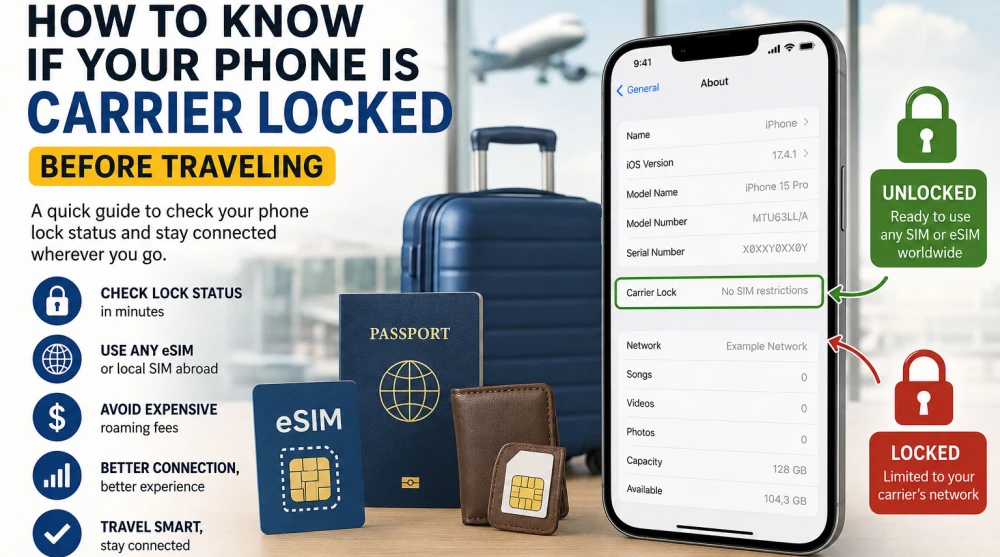
Apple has made it incredibly simple to check your device’s lock status directly within the operating system. You do not need to call your carrier to find out.
Here is the step-by-step process:
If the text next to this section says "No SIM restrictions," your iPhone is fully unlocked and ready for international travel. If it displays the name of your domestic carrier or says "SIM Locked," the device is restricted.
Checking an Android device can be slightly more complex because different manufacturers customize the operating system menus. However, the general path is usually similar.
For most other Android devices, go to Settings > About Phone > Status (or SIM Status). If the network status shows "Unlocked" or allows you to manually search for other networks, you are good to go. Because Android menus differ so heavily, the physical test (explained below) is often the most reliable method for these brands.
If you want absolute certainty, the physical swap test is the oldest and most foolproof method.
If the phone connects to the new network, displays signal bars, and allows you to load a web page or make a call, your phone is unlocked. If you see a pop-up asking for a "Network Unlock Code" or the phone says "Invalid SIM," your phone is locked. You can also test this by attempting to install a free or cheap digital profile just to see if the operating system accepts it.
If you ignore the lock status and proceed with buying a digital travel plan, you will hit a frustrating roadblock.
A locked phone simply cannot install an eSIM from a competing network. The operating system will actively block the installation process. If you are trying to use a physical local card, the phone will refuse to read it. You will have absolutely no mobile internet.
Typically, your screen will display error messages such as "SIM Not Supported," "Network Locked," or "Carrier Restricted." If you have managed to force the installation but still cannot connect, the issue might be different; in that case, reviewing why an [eSIM Installed but No Internet?] might solve your problem. But if it is a true carrier lock, the profile will never activate.
If you discover your phone is locked, do not panic. It is entirely possible to unlock it, provided you meet your carrier's criteria.
You must contact the customer service department of the network that currently locks the phone. Only they have the administrative power to remove the software restriction. Do not trust third-party websites that ask for payment to unlock your phone.
Most carriers require that:
Once you submit an unlock request, it is rarely instantaneous. It can take anywhere from 24 to 72 hours for the carrier to process the request and send the unlock signal to your device. This delay is exactly why learning [How to Prepare Your Phone Before Traveling Abroad] weeks in advance is critical.
Generally, no. However, some carriers offer temporary international unlocks for travelers or exceptions for deployed military personnel. It is always worth calling and asking.
A very common worry among users is that unlocking their device will result in lost photos, contacts, or apps.
The answer is a definitive no. Unlocking a phone does not require a factory reset. There is no data loss involved. The carrier simply updates the network permissions in the background over an internet connection. Once complete, you just restart your phone, and the lock is permanently removed while all your personal data remains exactly as you left it.
This is one of the most frequently asked questions by modern travelers.
Usually, the answer is NO. The carrier lock applies to the entire device's communication hardware. Even if your highly advanced phone perfectly supports digital profiles, the software restriction prevents you from adding a profile from any provider other than your domestic carrier. The lock does not discriminate between physical plastic and digital code. While many wonder [Does an eSIM Have Better Signal Than a Physical SIM?], it does not matter if the device refuses to accept the network in the first place.
Avoid these frequent pitfalls that leave travelers offline:
Run through this fast checklist before you head to the airport to guarantee a smooth, connected trip:
What does "SIM Not Supported" mean on my iPhone?
This specific Apple error message means your iPhone is carrier locked. It indicates that the SIM card or digital profile you are trying to use belongs to a network that your device is restricted from accessing.
Can I unlock my phone myself?
No. A carrier lock is enforced by software on the provider's end. You must contact the network operator that originally sold the device to have the restriction officially lifted.
Does a factory reset unlock a phone?
No. Wiping your phone or restoring it to factory settings will delete all your personal data, but it will not remove the network lock.
Will an eSIM work if my phone is locked to AT&T?
No. If your device is locked to AT&T (or any other provider), it will only accept digital profiles and physical cards issued directly by AT&T.
Is it legal to unlock a phone?
Yes, absolutely. In most countries, including the US, UK, and EU, it is your legal right to unlock your device once you have fulfilled your financial obligations (like paying off the device installment plan).
How much does it cost to unlock a phone?
If you meet your carrier's requirements (the device is paid off), unlocking is usually completely free. Be highly suspicious of third-party services demanding a fee to unlock your phone.
How do I know when my carrier has unlocked my phone?
Your carrier will usually send you an email or SMS confirmation. For iPhones, you can simply check the Settings app to see if the "Carrier Lock" status has changed to "No SIM restrictions."
Can a locked phone use Wi-Fi?
Yes. A carrier lock only restricts cellular network connections (mobile data, standard voice calls, SMS). It has absolutely no effect on your ability to connect to Wi-Fi networks.
If I buy an unlocked phone, will it work anywhere?
Generally, yes. A factory-unlocked phone will accept SIMs from any carrier worldwide, provided the phone's internal antennas support the specific radio frequencies used in your destination country.
Do travel digital profiles come with a phone number?
This depends entirely on the specific plan you purchase. Many travel profiles are data-only, while others include a local number for calls and SMS. Always read the package details carefully before purchasing.
Taking five minutes to check your phone’s lock status before purchasing a travel plan is the most important step in your pre-trip preparation. A locked phone forces you into expensive roaming traps, while an unlocked device opens the door to flexible, affordable, and high-speed internet anywhere in the world. Check your settings, contact your carrier if necessary, and ensure your device is truly yours to use.
Before traveling, compare available plans to find the perfect fit for your itinerary. Whether you need an Europe eSIM for a multi-city train tour, an Asia eSIM to navigate bustling tech hubs, or reliable connectivity via a North America eSIM or Latin America eSIM, your unlocked phone makes it effortless. If your journey takes you further, explore the Africa eSIM regional coverage, or dive into popular single-country options like eSIM Japan,TeSIM Thailand, eISM Turkey, the eSIM USA, eSIM Canada, or eSIM China. Secure your digital travel profile today and land with absolute confidence.
A carrier locked phone has a software restriction enforced by the telecommunications company that originally sold you the device (usually on a contract or installment plan). This restriction ensures the device can only connect to their specific network. If you try to use a competitor's service, the phone's operating system will block the connection.
The most reliable and universal method is the physical SIM card test. Simply insert a SIM card from a different network operator. If the phone gets a signal and you can make a call or load a website using mobile data, it is unlocked.
For iPhone users, there is a direct way through the settings: go to Settings > General > About. If the Carrier Lock field says "No SIM restrictions," your device is fully unlocked and ready to use anywhere.
The short answer is no. A network lock applies to the entire communication hardware of the device, regardless of whether it is a physical SIM tray or an embedded digital chip. Even if your phone is the latest model and perfectly supports digital profiles, the software restriction will not allow you to install a plan from another provider.
Absolutely not. The unlocking process does not require a factory reset. Your photos, contacts, messages, and apps are completely safe. Unlocking happens in the background via a network permissions update over the internet. Once complete, you usually just need to restart your device.
Once you submit an official request to your carrier, the process rarely happens instantly. It typically takes between 24 and 72 hours for the administrative team to process the request and send the unlock signal to your smartphone. This is exactly why you should verify your lock status weeks before your departure date.
Yes, in the vast majority of cases, unlocking is completely free as long as you meet your carrier's requirements. The most common conditions are: the device is fully paid off, you have no outstanding bills, and your initial contract period has expired. You must contact your carrier directly to initiate the process—avoid paid third-party services online.
This is the classic error message on Apple devices indicating that your iPhone is carrier locked. It means that the physical card or digital profile you are trying to activate belongs to a network that your device does not have software permission to access.
No. If you arrive in a foreign country and buy a cheap local SIM card at the airport, your locked phone will refuse to read it. In this situation, you are forced to rely solely on public Wi-Fi networks or pay for the expensive international roaming packages offered by your domestic carrier.
From a hardware and software perspective, yes. Every iPhone model is designed to work with multiple networks worldwide. Locking is entirely an administrative measure implemented by telecom companies. Once your carrier approves the removal of the restriction, the phone automatically becomes a globally unlocked device.
It is absolutely mandatory. This is the most important step before any international trip. If you skip this check and purchase a digital plan, you will waste your money, as you will not be able to install the profile on a locked device. Taking two minutes to check beforehand guarantees hassle-free internet access right after landing.