02.11.2026
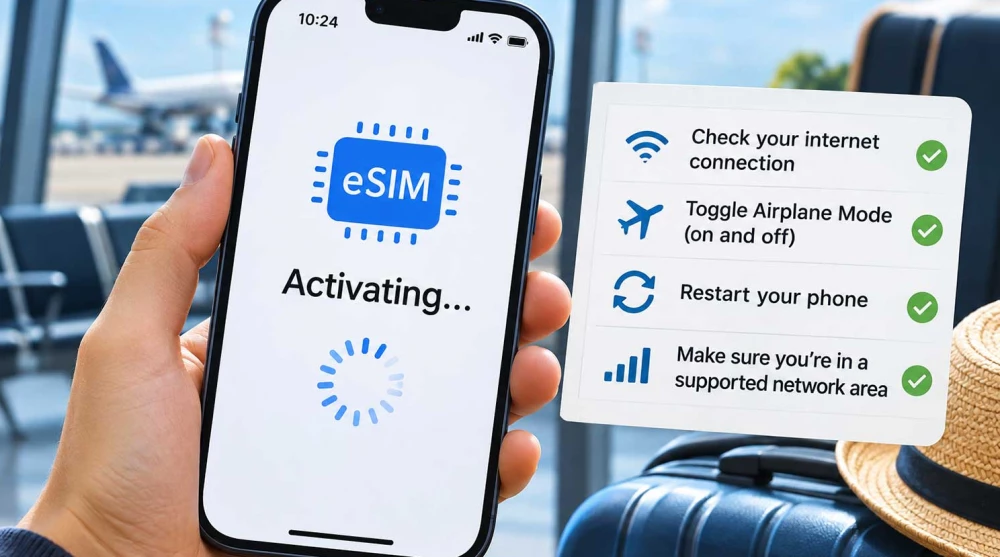
Imagine this real-world scenario: you have just purchased your digital travel plan, scanned the provided QR code with your phone's camera, and expect everything to wrap up in seconds. Instead, the message "Activating..." appears on your screen and stays there for a long time with no visible progress. This is a moment that can cause anxiety for any user, especially if your trip is approaching or you are already abroad.
It is important to know that this status does not necessarily mean your digital card is damaged, that you made a mistake during scanning, or that you have lost your money. Very often, the profile has already been successfully downloaded and added to your phone's memory, but the device has not yet managed to register on a supported mobile network, or it is waiting for confirmation from the provider's servers. To resolve this issue effectively, we must make one critical distinction right from the start: the process of physically installing the profile onto your device is completely different from the process of activating the actual telecommunications data package.
To understand why the phone gets "stuck" at this stage, we need to look at what happens in the background. When you scan the QR code, you initiate a chain of three separate but interconnected processes. The first is downloading and installing the eSIM profile from a secure server (SM-DP+) into your phone's chip. The second is the activation or preparation of the profile by the service provider. The third is registering on a local mobile network and actually starting to use the service.
The "Activating" status can mean entirely different things depending on your phone's operating system, the specifics of the carrier, and the current setup stage. In some cases, this message indicates that the phone is still downloading data. In others, it means the device is trying to connect to the network for the first time to validate the profile.
Not always. Many users assume that seeing this label means the profile is completely absent from the device. You can easily verify this by going into your mobile network settings. If you see the new profile in your list of available plans (even if it says "Activating" next to it), it means the initial data download was successful. In this case, the profile is saved in the eSIM module, but its network configuration is not yet complete.
There are several specific reasons why this process might be interrupted or significantly delayed. Not all of them are equally likely. The most common scenarios include:
The lack of a supported mobile network is one of the possible reasons for initial connection issues with a travel eSIM, but if you are on a fast home Wi-Fi network and the problem persists for hours, it is likely an interrupted server connection or a software bug.
Yes, in most cases, pre-installation is highly recommended because you have a reliable and secure Wi-Fi network at home, which minimizes the risk of download errors. Let's look at a typical example of a user living abroad who is planning a trip back and purchases an eSIM Bulgaria. They can scan the code a day before their flight. The profile will install on the phone, but the actual validity of the data package usually begins only when the device connects to a Bulgarian network.
The situation is similar if you are planning a vacation to a neighboring country. You can safely install your eSIM Turkey while waiting for your flight at the airport. The profile will be downloaded, but the phone won't be able to connect to a Turkish operator yet. For many travel plans, the service (and the countdown of validity days) starts upon the first successful registration or the first recorded mobile data traffic in the supported destination. This depends on the specific product and provider conditions, but the technological logic is designed precisely for pre-travel convenience.
When you scan the code at home, the phone installs the data and immediately starts searching for the networks authorized by that specific profile. Since you are not physically in the coverage country, the device doesn't detect partner antennas. As a result, the operating system might leave the status as "Activating" or "No Service" because it is waiting for a moment when it detects an authorized signal. With some travel eSIMs, the phone might show "Activating" or "No Service" prior to arriving at the destination. This does not always mean a technical problem. However, if the profile installation hasn't finished, you should check your internet connection and the provider's instructions.
If you are using an Apple device and the process seems blocked, there is a clear sequence of steps you can take to help the system complete the setup.
Important Note: Never resort to deleting the profile and re-scanning the QR code as a troubleshooting method unless support has explicitly instructed you to do so.
The Android operating system, used in devices like Samsung Galaxy, Google Pixel, and other brands, has its own specifics when managing network profiles. Menu names often differ (e.g., "Connections" on Samsung and "Network & internet" on Google Pixel), but the troubleshooting logic is similar.
Start with the mandatory check of your internet connection. Then, go to your SIM Manager or Mobile Networks to verify if the profile appears in the list. If it is there, ensure that the toggle switch next to it is in the active (On) position. Restart your device, as Android phones often need a reboot to fully apply new network configurations. Check for system updates that might contain critical patches for the phone's modem, and confirm that your device officially supports digital cards and isn't software-locked by a previous carrier.
On these devices, the problem can very often be a software bug in the specific Android version or within the SIM Manager app. The delay might also be related to the device's software, the eSIM profile settings, or the communication with the provider's systems.
The situation gets a bit more complex when you have already arrived at your destination but lack connectivity. Suppose you land in Hanoi or Ho Chi Minh City with an installed eSIM Vietnam. You expect the internet to start immediately, but the phone stubbornly continues searching for a suitable network. Or you arrive in Bali with a prepared eSIM Indonesia, but there is no internet. In these moments, it is critical to distinguish the exact symptom.
If the profile still shows "Activating" even after a restart and waiting, the issue is likely with the installation itself or at the provider's server level.
If the profile is installed successfully but shows a "No Service" message or continuous "Searching", the issue lies in network registration. The phone is failing to latch onto the local partner operator. In this case, you need to check if you have turned on the respective line and attempt a manual network selection from the settings.
The third scenario is seeing a clear mobile signal (carrier name and coverage bars) but having no internet access. Here, the problem is usually a lack of additional configuration. The Data Roaming option must be turned on for many travel eSIM plans in order for mobile internet to work. Turning on Data Roaming, however, does not by itself solve issues related to a stuck download or incomplete profile installation. It only helps when the line is active and registered.
This is one of the most frequently asked questions, but unfortunately, there is no single or universal answer valid for all providers and networks worldwide. The process of downloading the profile over a fast Wi-Fi network usually takes between 1 and 3 minutes. Registration to the local network after landing should also happen within a few minutes.
We must clearly distinguish a normal short wait during initial setup from a prolonged technical issue. If after 10-15 minutes—during which you have verified your internet connection and restarted your device—there is no change in status, it is entirely justified to move on to the next diagnostic steps.
If you are at home and installing a profile for a future trip, yes, it is completely normal for the status to remain pending until you reach your destination. But if you are already in the coverage country, waiting for hours definitely indicates a technical hurdle that requires intervention.
If you have exhausted all basic troubleshooting steps and the situation remains unchanged, it is time to turn to the professionals. For example, if you are traveling for work and bought an eSIM Canada, but after arriving your phone stubbornly won't finish setup, it can disrupt your plans. The same applies if you land in London and find your eSIM United Kingdom refuses to connect, forcing you to verify if the phone is unlocked and if the plan supports the network in your area.
When contacting your provider's support team, providing accurate and complete information is extremely important to get a quick resolution. Have your order number ready beforehand. State the exact model of your phone and operating system version. Clarify which country you are currently in and what the exact status of the profile is in the menu (e.g., "Activating", "No Service", or something else). The most helpful thing you can do is attach a clear screenshot of the error or your Mobile Data settings screen.
This rule cannot be emphasized enough. Many profiles are programmed with security protocols that allow only a single installation on one device. Deleting a stuck profile in hopes that a fresh scan will fix things most often results in a message stating the code is no longer valid. This can make reinstallation completely impossible without the provider issuing an entirely new code.
To reduce the risk of issues and ensure a reliable connection, advance preparation is key. Always check if your smartphone is factory unlocked and officially supports digital cards before making a purchase. Perform the installation at home using a secure and stable Wi-Fi connection to avoid interruptions during the profile download. Ensure you buy a package tailored specifically for the destination you will visit, and familiarize yourself with instructions for additional settings like Data Roaming. If you still encounter a persistent issue with the "Activating" status, do not delete your profile. Instead, restart your device, check your network configurations, and do not hesitate to contact the support team. When choosing a reliable platform for your travel plans like HandySIM, you gain not only access to global connectivity but also the technical assistance necessary for a peaceful journey.
This usually happens when your phone is trying to connect to a supported mobile network but cannot find one locally. If you are still at home, your travel eSIM will remain in this state until you reach your destination. It can also occur if your internet connection dropped during the initial setup process.
The initial profile download over a stable Wi-Fi connection typically takes between 1 and 3 minutes. Network registration after arriving at your destination should also complete within a few minutes. If the process takes longer than 15 minutes while you are abroad, you may need to troubleshoot your connection.
Yes, it is highly recommended to install your eSIM profile at home where you have a secure and stable Wi-Fi connection. The profile will be safely stored on your device, though it may show as "Activating" or "No Service" until you arrive. Your actual data plan usually activates only when the device connects to a supported network abroad.
Yes, a stable and secure Wi-Fi connection is strictly required for the initial downloading and installing of the eSIM profile. You cannot use your current mobile data to download a new eSIM profile in most cases. Avoid using public captive Wi-Fi networks at airports or hotels, as they often block the necessary background traffic.
On an iPhone, activation can fail if the device is carrier-locked or experiencing a temporary iOS software glitch. Toggle Airplane Mode on and off, or restart your device to force the system to refresh its network requests. You should also check for any pending Carrier Settings Updates in your general settings menu.
Android devices might experience activation delays due to software bugs in the SIM Manager app or pending system updates. Sometimes, the device requires a full restart to properly apply the newly downloaded network configurations. Ensure your specific phone model officially supports digital profiles and isn't locked by a previous carrier.
No, you cannot use mobile data or connect to the internet while the profile is still stuck on the "Activating" status. This message means the network registration process is incomplete, so no data transfer can occur yet. You must wait for the status to change or perform troubleshooting steps if you are already at your destination.
Yes, restarting your smartphone is one of the most effective troubleshooting steps you can take for network issues. A reboot clears temporary software glitches and forces the phone's modem to initiate a fresh search for available operators. Do this especially if toggling Airplane Mode on and off does not resolve the issue.
No, you should never delete your eSIM profile if you are experiencing activation delays or network issues. Most travel QR codes are strictly single-use, meaning deleting the profile will permanently invalidate your purchase. If you remove it, you will likely need to contact customer support to issue a completely new code.
If you have verified your internet connection, restarted your phone, and the profile still won't activate at your destination, contact technical support immediately. Provide them with your order number, device model, and a screenshot of your current network settings. They can check if there are server-side issues or if your device needs a replacement profile.