23.10.2026
You are traveling to Switzerland, you have purchased your travel eSIM with 10 GB of mobile data included, and you have successfully completed the installation process. Upon arriving at the airport, you turn off airplane mode and see that your phone immediately shows a strong network signal from a local operator. However, despite having reception, the internet does not work. Web pages do not load in the browser, and communication apps report a lack of connection.
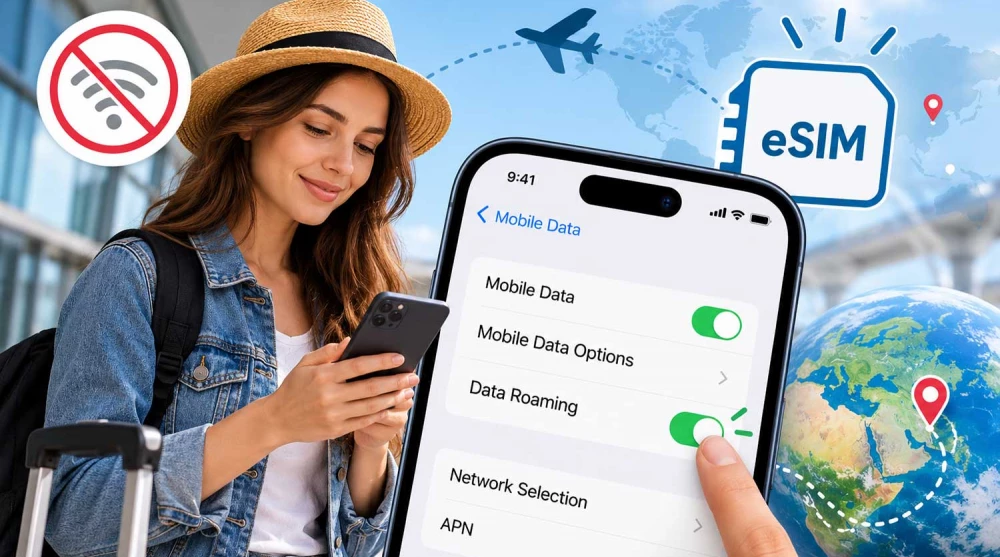
The most common reason for this frustrating situation is simply a single disabled setting in your smartphone's menu — Data Roaming. Travel eSIM plans in most cases use complex international roaming agreements to provide you with high-quality mobile internet through the networks of local telecommunication operators. For this system to function, the phone itself must have your explicit permission to use mobile data in roaming mode. Purchasing a profile for a specific destination does not necessarily mean that you are using a direct local SIM service issued by an operator in that country. When using an eSIM Switzerland, your phone might connect to a local mobile network, but if the plan operates through international roaming, you must allow data roaming to gain internet access.
The Data Roaming setting is a built-in feature in every modern mobile operating system. It allows your phone to use mobile data over a network that is not the primary (home) network of the corresponding SIM or eSIM subscription.
To fully understand the concept, it is important to distinguish three main terms. The mobile network is the physical infrastructure of antennas and servers to which your phone connects. The mobile operator is the company that owns and manages this infrastructure or provides the service. Roaming is the actual process of using telecommunication services through a partner mobile network when you are out of your provider's coverage area. It is important to remember that Data Roaming is simply a software setting on your phone that allows this transfer of information, and it is not a separate paid internet package or a standalone service that you need to purchase additionally.
This is the technical process that runs in the background to provide you with a stable connection abroad. The simplified connection scheme looks like this: Phone → Local operator → Roaming agreement → eSIM provider → Internet. This sequence illustrates the logical provision of the service, not the mandatory physical route of every single byte of internet traffic.
The process unfolds in a few clear steps. First, the installed eSIM profile contains unique identifiers (like an IMSI number) through which the mobile network recognizes which provider the subscription belongs to. Second, upon your arrival, the phone scans radio frequencies and discovers available local mobile operators. Third, the network sends a request to the central registries to verify if your profile has a valid agreement and the right to use its services. Fourth, upon successful authentication, the phone registers to the authorized operator and gets signal coverage. Fifth, if the service is roaming-based (as most travel plans are), the Data Roaming feature must be enabled to allow mobile data to flow through this foreign network. Finally, after a secure internet connection is established, you can use all your applications seamlessly. The main technical highlight here is that physically registering to the mobile network (getting signal bars) and establishing the actual internet connection are two completely different and independent processes. When using an eSIM China, the travel plan may operate through an international provider that has agreements with one or more local operators in Asia.
This is a logical and very frequent question from users who rightly wonder why additional settings are needed for a localized product. The answer lies in the important difference between the country the plan is intended for and the country where the mobile service provider is physically registered.
When you buy a travel package for a specific territory, you pay for the right to use data there. However, the eSIM profile itself is often generated and provided by a large international telecommunications hub (MVNO), which could be based in Europe, North America, or Asia. Even when you purchase an eSIM Macau, the phone might use roaming because the internet service is provided through a partner mobile network based in another country that holds global connectivity agreements. When you arrive at your destination, your phone practically connects to the local network in roaming mode relative to the profile issuer. The important takeaway is that activating Data Roaming does not automatically mean you will pay additional or hidden fees. With a travel eSIM, roaming is simply the normal, technologically inherent way your prepaid plan grants you access to the global internet network.
If you forget to enable this setting, your device will behave in a specific way that often confuses users. The most visible symptom is that the phone will show a strong mobile signal in the top corner of the screen. You will see the name of the local telecommunication operator to which you have successfully connected. It is even possible that an indicator for a high-speed network like 4G or 5G will be displayed next to the operator's name.
Despite all these indications that you are connected, the internet will absolutely not work. Browsers will show messages about a lack of connection, and social networks and communication apps will fail to send or receive messages. It is important to clarify that behavior may vary depending on the device configuration and plan specifics, but in most cases, the disabled setting acts as a software barrier. The phone is connected to the operator's antenna, but the operating system itself refuses to send mobile data because it has not received your explicit consent to do so in a roaming environment.
The settings in the iOS operating system are structured intuitively, but precision is required when multiple SIM cards are present. To activate roaming for your new line, open the main "Settings" menu on your iPhone. From there, select the "Cellular" (or "Mobile Data" depending on your region) menu.
In the list of available plans (SIMs), find and select your new travel eSIM. Once you enter the details of this specific profile, locate the "Data Roaming" toggle switch and turn it to the ON position (green). Make sure that this exact eSIM line is also set as the active one for the Mobile Data function in the main cellular menu. It is especially important for dual-line devices that you carefully check which one is using mobile data to avoid incorrectly routing your traffic.
The Android ecosystem is diverse, which is why the exact names of the menus may vary by manufacturer, but the logic remains identical.
On Samsung brand devices, the process is divided. Open "Settings" and go into "Connections". From there, select "Mobile Networks" and enable the "Data Roaming" option. Additionally, you must instruct the phone which card to use for the internet. Go one step back to the "Connections" menu, enter "SIM Manager", tap on "Mobile Data", and select the newly installed travel eSIM. On some Samsung models, the roaming setting is global for the entire device and is not managed separately for each SIM line, which makes selecting the correct line in the SIM Manager critically important.
On Google Pixel phones and most stock Android devices, the path is slightly different. Open "Settings", then select "Network & Internet". Go into the "SIMs" section, choose the specific travel eSIM from the list, and enable the "Roaming" toggle. If you use an eSIM Japan on an Android phone, check that the travel eSIM is explicitly selected for mobile data and that the required roaming is allowed in the profile settings.
This section addresses one of the biggest concerns for travelers, who associate the word "roaming" solely with astronomical phone bills. The truth is that turning on the Data Roaming feature in the menu does not generate or incur any charges on its own.
Data billing depends entirely on the terms of the active plan and exactly which SIM card you have selected to provide the connection. With a travel eSIM that is prepaid and includes roaming in the respective country, using mobile data on supported networks is a core part of the plan's terms. Since these cards are prepaid, they cannot generate overages or additional bills. The danger of high fees comes solely from your home SIM card, which might have completely different and much more expensive roaming rates outside your home continent. The best practical advice is to strictly select the travel eSIM as the sole source of mobile data and ensure your home card is not permitted to use roaming internet.
When using modern dual SIM smartphones (two active cards simultaneously), proper settings management is a prerequisite for stress-free travel. If your primary card is from a UK operator and you are traveling outside Europe, using it for data could be very expensive.
The recommended device configuration should look like this:
|
Setting |
Primary SIM |
Travel eSIM |
|
Mobile Data |
Not selected |
Selected |
|
Data Roaming |
Turned off, unless needed |
Turned on, if required by the plan |
|
Voice Calls |
According to your needs |
According to the plan's capabilities |
This setup ensures you will not be hit with surprise charges for background traffic. Additionally, you should pay attention to functions that automatically switch mobile data between lines (e.g., "Allow Cellular Data Switching" on iPhone). This feature must be turned off so it does not allow the phone to autonomously switch to the expensive home card during a temporary loss of signal. When using an eSIM Turkey, you can leave your primary SIM card active for calls and texts in emergencies, but set the travel eSIM as the sole source of mobile data.
The short and clear answer to this question is: No. This is an important technical clarification that demonstrates the variety of architectures in modern mobile services.
Roaming-based eSIM plans (which make up the vast majority of travel products on the market) utilize partner mobile operators' networks and almost always require Data Roaming to be enabled. On the other hand, there are local eSIM plans issued directly by a telecom in the destination country. These profiles are recognized by the network as a local subscription and can work perfectly without needing you to turn on roaming. The necessity of this setting depends entirely on the configuration and network affiliation of the specific product, not simply on the fact that you are using a digital eSIM instead of traditional plastic.
If you have followed all the steps and activated the feature, but mobile data is still missing, you need to perform a quick practical diagnostic. There are a few primary reasons why the connection might not be established.
First, ensure absolutely that the travel eSIM is selected as the primary line for mobile data in the settings. The second most common reason is incorrectly configured or missing APN settings, which the device needs to access the internet gateway. Third, your phone might have connected to an operator with which your plan does not have an active agreement — in this case, you must manually select a supported network from the settings. Other factors include exhausting the data limit of the purchased package, the plan's validity period expiring, or simply a temporary technical issue with the local infrastructure. The proper troubleshooting sequence requires checking: the selected data line → the Data Roaming status → the connected network operator → the APN accuracy → the plan's status itself. If necessary, turn on airplane mode for a few seconds and turn it off again to force a new network registration. An important rule when resolving such issues is never to delete the eSIM profile as a first step, since this action is irreversible. If your eSIM USA has no internet even after turning on roaming, check if the phone is connected to an operator supported by that specific plan, as coverage in North America is often divided among different networks.
The technical necessity of activating roaming boils down to three key points. Travel eSIM plans are in most cases designed to utilize global international roaming agreements to ensure stable coverage. For these products, the Data Roaming feature must imperatively be allowed at the system level so that mobile internet can function properly through local partner networks. Turning on this option specifically for your travel eSIM does not automatically generate unwanted extra fees, as data usage is already included in the terms of the prepaid package. For many modern travel eSIM plans, roaming is not a luxurious extra service, but the very fundamental technology through which you receive high-quality and reliable mobile internet abroad.
Most travel eSIM plans use international agreements to provide you with access to local mobile networks. In order for your phone to exchange traffic through these partner networks, you must explicitly allow roaming. Without this setting, the operating system blocks mobile internet as a precaution.
Most travel eSIM profiles base their service on roaming agreements, and without this setting, the internet will not function. The only exceptions are local eSIM plans issued directly by a local operator in the respective country. If your card requires roaming, without it, you will only have a network signal but no actual connectivity.
Having coverage only indicates that your phone has successfully registered to the local operator's cellular network. However, for mobile data to flow, the device needs an active roaming setting and a correctly entered APN. If these conditions are not met, the operating system stops the data transfer despite the excellent signal.
Open the "Settings" menu and select "Mobile Data" (or Cellular). From the list of SIM cards, choose your travel eSIM profile to enter its details. Find the "Data Roaming" option and activate the toggle switch so that it turns green.
On Android devices, open "Settings" and navigate to the "Network & internet" or "Connections" section. Select the mobile networks or SIM management menu and click on the active travel eSIM. Activate the data roaming toggle and ensure that the same card is selected as the primary source for the internet.
Turning on the setting itself does not automatically generate additional fees when using a prepaid travel eSIM. Using mobile data in roaming is a core part of your pre-purchased package and cannot exceed its limit. The danger of high bills only exists if you allow roaming on your primary home SIM card outside its free coverage area.
Not all digital cards require activating this feature, as their architecture differs. Local eSIM plans, issued directly by a telecom in the destination country, work as a local subscription and do not need roaming. However, most global and regional plans rely on international partnerships and strictly require the setting to be turned on.
Yes, it is highly recommended to disable data roaming for your primary card to avoid unexpectedly high bills. Leave the feature turned on only for the travel eSIM, which is designed to provide you with mobile internet. For added security, also turn off the option to automatically switch mobile data between the two active cards.
If you have activated the feature but the connection is still missing, there is most likely an issue with your APN configuration. Another common reason is that the phone has not selected the correct eSIM card as the primary source for mobile data in the settings. It is also possible that you have exhausted your package limit or the device has connected to an unsupported local network.
Mobile data is the phone's general feature that allows it to connect to the internet via a cellular network, regardless of location. Data roaming is a specific additional permission for the device to use this internet when connected to a foreign, partner network outside the home operator's coverage. For the travel eSIM to work abroad, both settings must be turned on simultaneously.